Pressure - A CPU Stress Tester
Description:
Pressure is a CPU stress tester. It can either be run in a console window or installed as a Windows service. A separate console program is used to communicate with and control the service.
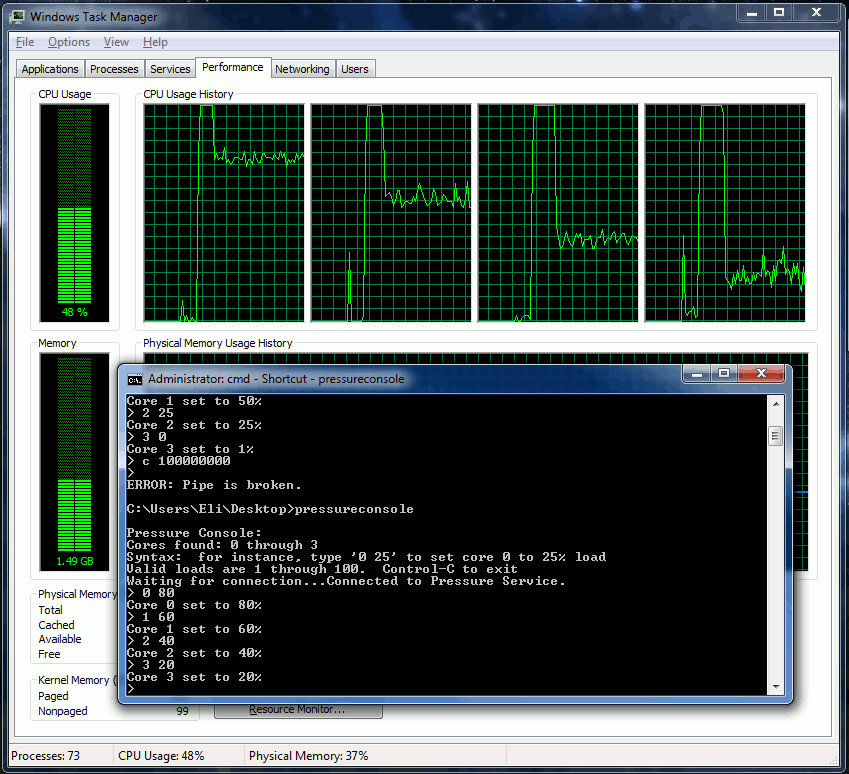
PressureService.exe
- Service Mode
-
install via the .net utility "installutil.exe". Found (for instance, on my machine) in:
C:\Windows\Microsoft.NET\Framework\v4.0.30319\InstallUtil.exe
For instance:
"installutil PressureService.exe" to install
"installutil /u PressureService.exe" to uninstall
Installutil pops up a gui that asks for a computername\username combination and password in order to install the service. - start/stop via "net start pressure" or "net stop pressure", or via the services GUI.
-
install via the .net utility "installutil.exe". Found (for instance, on my machine) in:
-
Console Mode
- activate console mode via the "-console" command line flag. For instance: "PressureService.exe -console"
- Behaves the same as service mode, except its not a service. End with 'q'.
PressureConsole.exe
-
Interactive Mode
-
Looks like this:
-=-=-=-=-=-=-=-=-=-=-=-=-=-=-=-=-=-=-=-=-=-=-=-=-=-=-=-=-=-=-=-=-
Pressure Console:
Cores found: 0 through 3
Syntax:  for instance, type '0 25' to set core 0 to 25% load
Valid loads are 1 through 100.  Control-C to exit
Waiting for connection...Connected to Pressure Service.
> 0 50
Core 0 set to 50%
> 1 75
Core 1 set to 75%
> ^C
-=-=-=-=-=-=-=-=-=-=-=-=-=-=-=-=-=-=-=-=-=-=-=-=-=-=-=-=-=-=-=-=-
-
Looks like this:
-
Batch Mode
- Batch mode wants "-x" as its first argument, then core:percent pairs. For instance: "PressureConsole.exe -x 0:50 1:75"
-
Looks like this:
-=-=-=-=-=-=-=-=-=-=-=-=-=-=-=-=-=-=-=-=-=-=-=-=-=-=-=-=-=-=-=-=-
C:\pressureconsole.exe -x 0:50 1:75

Pressure Batch Mode:
Waiting for connection...Connected to Pressure Service.
Sent: set core 0 to 50%
Sent: set core 1 to 75%
-=-=-=-=-=-=-=-=-=-=-=-=-=-=-=-=-=-=-=-=-=-=-=-=-=-=-=-=-=-=-=-=-
There is also an easter egg command. "c 100000000" for instance will instruct the service to loop 100000000 times before sleeping. This can be used to tweak the service to a particular processor speed.
Known Caveats:
- We allow the settings of values 1-100%. The actual CPU usage is close, but not as precise as single percentage points would imply. Other things happening on the system will also add to the CPU usage - this program is only attempting for instance to do 25% cpu by itself. It doesn't notice other program's usage.
- Low CPU values are accomplished via sleep()ing the threads. Setting a low value, (say 1%) then immediately setting a high value won't work - the thread is still sleepy and will remain so until it feels it has met its original 1% obligation and wakes back up.
- Only tested on a single processor with 4 cores. Theoretically has a hardcoded limit of 1024 cores. Untested as to whether 1024 works, but 1025 will definitely fail.