Hexadecimal Hackpad
I put this custom number pad together because I cannot seem to teach myself not to hit "4" instead of "F" when typing in memory addresses. It is based on a "cospad" PCB from kprepublic.com. Most of the forum posts and similar I found when looking for help with this board were out of date/suffering from link rot, so I'm doing a quick braindump here now that I've gotten everything working.
Goals:
- Input of characters 0,1,2,3,4,5,6,7,8,9,A,B,C,D,E,F
- Easy input of escape formats "0xDEADBEEF" and "\xDEADBEEF"
- Quickly add/subtract memory addresses after popping calc.
- Going for a grubbby retro 80s-90s computing aesthetic.
Assembly Notes:
This board is known as a "cospad". It seems a little old in the tooth at this point (I think I saw the year 2014 somewhere in reference to this board, I am typing this in 2023.) I was unable to get the firmware flashed using the links provided by the vendor. (This included https://xd.tkg.io and https://kai.tkg.io/ as well as misc documents in a Google Drive folder.) I was successful using https://usevia.app to program the keyboard. (This may have required flashing the firmware provided by usevia.app prior to configuration. I used QMK Toolbox to flash. I'm not sure if this step was necessary, I had already done this step before I tried using their online configuration utility.)
usevia.app config: cospad-via.json
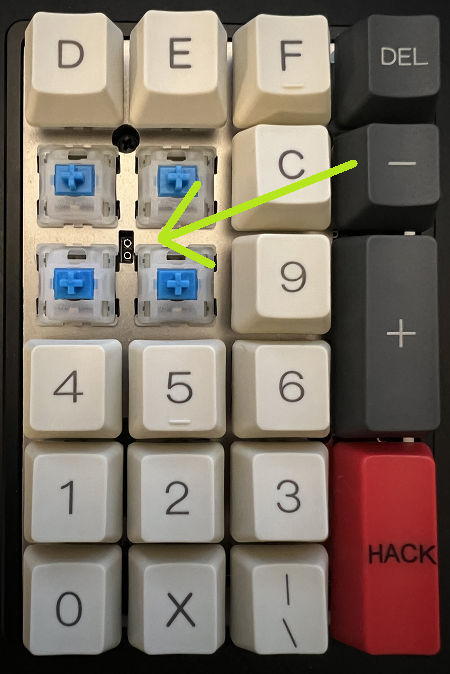
In order to boot the board into a flashable mode, you will need to short these two connections: Bottom view: https://i.imgur.com/CNZq6Xd.png mirror Top view: top view


I had previously attempted to use a prebuilt solution: EPOMAKER TH21 21 Keys Hot Swappable Wired Numpad with RGB Backlight, Programmable,Cherry Profile PBT Keycaps for Win/Mac(Epomaker Budgerigar Switch) I was not successful. I do not recommend using this numpad for this project, as the "Fn" key is not reprogrammable using the driver software and is right smack dab where I needed the "F" key to be. It might be possible using other software, I did not explore reflashing the firmware on this unit.
If you just want a hexidecimal numpad without the effort, consider IPv6 Buddy. It's got a couple different keys than what I put together but it works great and the creator seems like a good guy. It is also MUCH CHEAPER than building your own from scratch.
It's mini-USB, which seems appropriately archaic at this point. I only wish it was PS/2.
Glamour Shots:
Original Plan: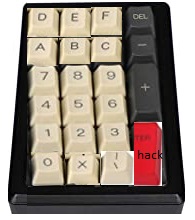
Final Product Top View:
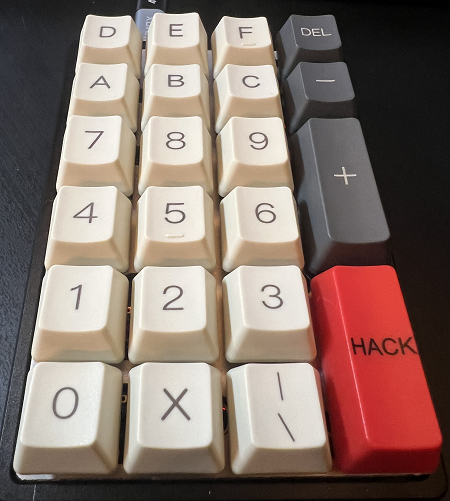
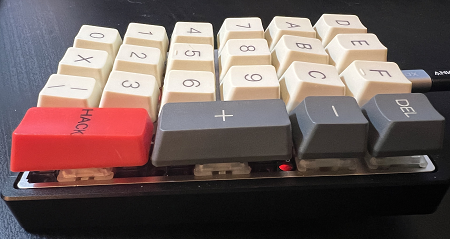
Final Product Side View:
Parts List:
- A big bag of mechanical key switches, I had a lot left over: gateron switch 3pin 5pin smd milky blue red black brown green clear yellow custom mechanical keyboard xd64 xd60 eepw84 gh60 - Gateron / Milky Blue / *70 switches × 1
- A set of stabilizers for the double sized keys: Everglide Black Transparent Gold Plated Pcb screw-in Stabilizers - Black 2u *4 × 1
- One case, from kprepublic.com: Anodized Aluminium case for cospad xd24 custom keyboard dual purpose case with CNC Aluminum Cone Feet - Flat Cospad Case Black × 1
- One mounting plate, from kprepublic.com: 20% cospad XD24 Stainless steel Plate Mechanical Keyboard Plate support PAD GHPAD Numpad × 1
- One PCB, from kprepublic.com: Cospad 20% Numpad XD24 Xiudi Custom Keyboard PCB × 1
- One keycap set. Note that for this particular set, the DEF and ABC keys vary in height, so they aren't perfectly in line on the hex pad. If that bothers you, choose your own keycaps. From Amazon.comYMDK 125 Keys ANSI ISO Keyset OEM Profile Thick PBT Keycap Set Suitable for Cherry MX Mechanical Keyboard YMD96 RS96 YMD75 KBD75 Standard 104 TKL 61 Keyboard (Only Keycap) (125 Keys Gray Beige)
- One custom printed "Enter" key from wasdkeyboards.com: Custom Text Cherry MX Keycaps
- Soldering iron, solder, etc. Work surface free of cats and other debris.